-
 Continue reading →: REMOVE DUPLICATES WITHOUT FORMULAS
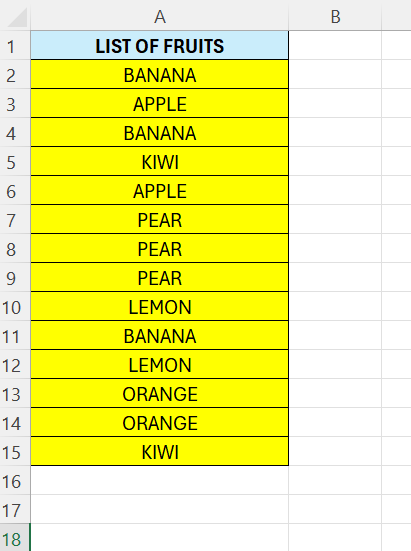
In the previous post we saw how we could use a formula to remove duplicates. Excel also has an in-built feature that let us remove the duplicates. Below we see a list of fruits, we can also see a lot of duplicates. To remove them, select all the cells –…
-
 Continue reading →: REMOVE DUPLICATES
Often there is duplicates in our data, EXCEL offers lots of ways to remove those. In this post we are going to use the UNIQUE function to get rid of the duplicates. In column A we have a list of fruits, un-sorted and there is lot of duplicates. In column…
-
 Continue reading →: EXCEL – GROUP AND SUBTOTAL
With the SUBTOTAL function, we can automatically group data. We can then perform different operations on it, like SUM or COUNT. Below we have number of sold fruits per month – categorized per fruit, and a calculated total per group. Below is our original data, it is unsorted and no…
-
 Continue reading →: GROUP AND SUM DATA
With the GROUPBY function we can organize data by categories, then find totals or averages. Below in column A we have some fruits, and in column B we have a number of lets say sold fruits. We want to calculate the total sum per fruit – we can see the…
-
 Continue reading →: EXCEL- CREATE SUBTOTAL
The subtotal function in Excel is a useful way to calculate smaller amounts of a range. Here we are going to calculate the total sum, but we will see how the function works. The goal is to calculate the total price in column C. Start by entering some data. Then…
-
 Continue reading →: Most frequently occurred word
In the last post we saw how we could find the most frequently occurring number. Here, we are going to find the most frequently occurring word. This is a little bit more tricky. There is no in-built function for this. We are going to use a combination of formulas. Below…
-
 Continue reading →: Most frequently occurred value
Sometimes we need to find out the most occurred value or number. There is a useful function we can use for this, the MODE function. This function is used to find the most frequently occurred value. We need to keep in mind that this function only works with numbers. Above…
-
 Continue reading →: Sum of largest N numbers
Sometimes we have a need to sum certain numbers in a range, here we are going to look at how we can sum the largest 3. First we need to find the largest number, we have a function for this, LARGE. Below in G6 we have the following formula: =LARGE(D7:D11;1)…
-
 Continue reading →: SUM ONLY IF NOT BLANK
Sometimes we have some values that we want to calculate. We only want to calculate them if the corresponding values are not blanks. In this part we are going to use the SUMIFS function. Lets clarify with an example. Above we have a list of fruits and its price and…
-
 Continue reading →: SEARCH RANGE FOR TEXT
Often we need to search a range for a specific word. The result we want is whether the word is present or not. To check if a value or a substring is present in a range we can use the SEARCH function. We will then combine this with the ISNUMBER…
-
Subscribe
Subscribed
Already have a WordPress.com account? Log in now.
 Excel tutorials