-
 Continue reading →: Calculate sum with Filter
Sometimes we dont want to calculate the sum or average for a whole column – just some part of it – based on a certain condition. Lets pretend we have a list of products and those belong to a category, and each product have its own price – then we…
-
 Continue reading →: EXTRACT DUPLICATES
If we have one or more lists in Excel – sometimes we need to extract duplicates from those lists. To achieve this we need to use multiple functions. In this example we are going to use the =FILTER() and =COUNTIF() functions. Below we have some example data in Column A…
-
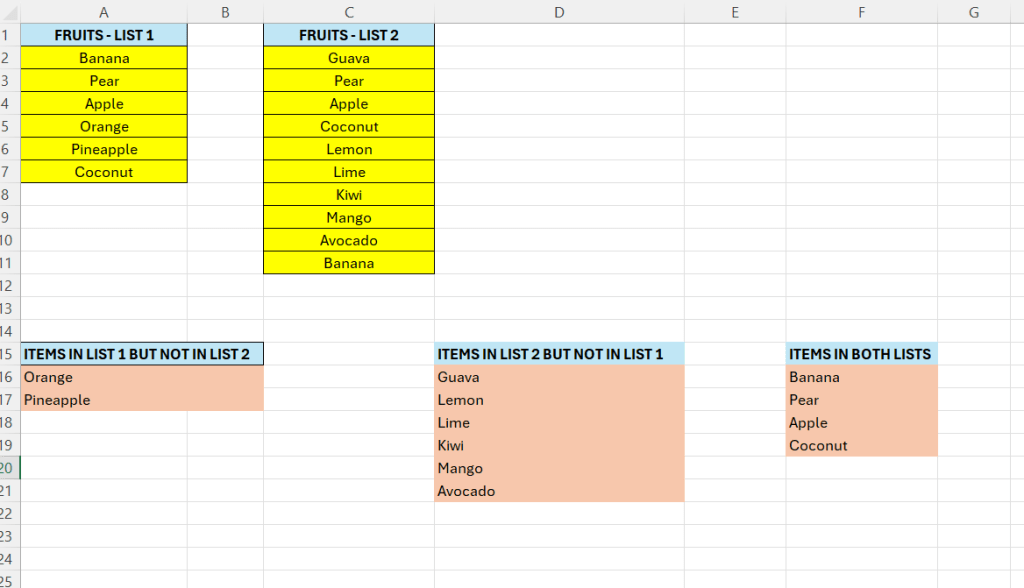 Continue reading →: Complete list/column comparison
In the last posts we have seen how we can compare lists in a number of ways – to either show differences or similarities. Lets put this together in a final example that shows the common values between lists, values that are in List A but not in List B,…
-
 Continue reading →: EXCEL – Extract common values
If we have two or more lists in Excel – it is sometimes of value to extract the common values between them – values that are both in List A AND List B. Here we are going to do this using the =FILTER() and =COUNTIF() functions. Lets enter some data…
-
 Continue reading →: EXCEL – compare columns – part III
Sometimes we want to compare columns and find out if a value is present or missing in the other column. In this example we have our 2 columns with fruits – we want to determine if the specific fruit in List A is present or missing in List B. Below…
-
 Continue reading →: EXCEL – compare columns – part II
In the previous post we saw how we could compare lists or columns, row wise. In that post we used the equal operator. One problem with that is that it is not case-sensitive. For example, below returns TRUE Sometimes we do not want this – we want to take case…
-
 Continue reading →: EXCEL – compare columns
In Excel we often have lists or columns that we want to compare for similarities or differences. There are a lot of ways to do this – depending of the type of comparison we want to do. Here we want to do a simple row by row comparison between two…
-
 Continue reading →: EXCEL – find last word
In Excel 365 there is a function we can use to extract the last word in a cell. Enter some data in Excel: We are going to make use of the =TEXTAFTER function This function extracts all text in a cell after a specific character or substring. In Cell B8…
-
 Continue reading →: Extract first word in a string
In Excel we can use a combination of formulas to extract the first word in a cell. Lets say we have a column full of names – but they are in the same column. The trick here is to find the space between the names. For this we will make…
-
 Continue reading →: EXCEL – count words in a cell
In Excel we can use forumlas to count the numbers of words in a given cell. We will make use of a combination of different text-functions available in Excel. In the image below – we have our word in cell C7 – how many words is there? Well, we can…
-
Subscribe
Subscribed
Already have a WordPress.com account? Log in now.
 Excel tutorials