We can use Excel to make a simple trivia quiz game. We are going to make use of simple formulas to achieve this.
First, create two sheets:
- Name the first one Questions
- Name the second one Score
Then enter your questions in a similar way like below.
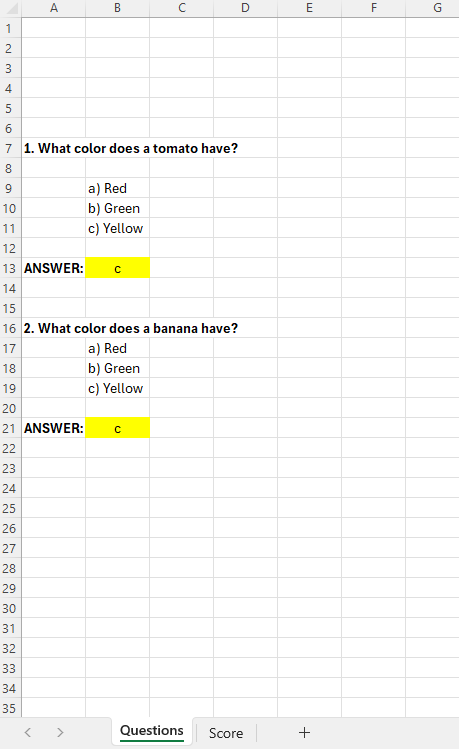
As you can figure out, the uses will enter the answer in the yellow cells.
In the sheet named “Score”, enter the correct answer for each question, here I have done that in column B.
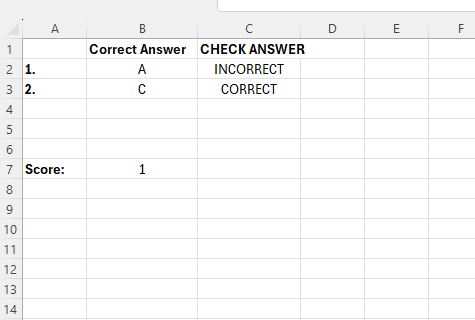
Our formula for checking the answers will reside in column C.
The first formula looks like this
- =IF(Questions!B13=Score!B2;”CORRECT”;”INCORRECT”)
What this says is, look if the value in cell B13 on the Questions sheet is equal to the value in cell B2, in the score sheet. If they are equal, output “CORRECT”, oterhwise “INCORRECT”.
Finally we can count the correct answers at the bottom:
- =COUNTIF(C2:C3;”CORRECT”)
Here the first argument is the range, and the second is the criteria, so we just count the number of values that states “CORRECT”.
 Excel tutorials
Leave a comment