The VLOOKUP searches for a value you specify and returns a matching value from another column.
The syntax is as follows.

- The first argument is the value to search for – this is of course required
- The second argument is the range of cells where to search for the lookup value.
- The third argument is the number of the column from which to return a value.
- The final argument determines if we want an exact match or approximate.
The important thing with VLOOKUP is that is only able to return values to the right of the lookup value.
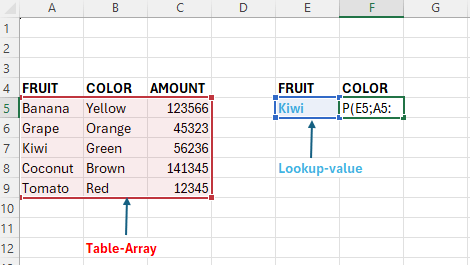
Above we want to return the color for the lookup-value “Kiwi”.
The value we want to return is the color, and this value is to the right of the value “Kiwi.
The complete formula in F5 is as follows:
=VLOOKUP(E5;A5:C9;2;FALSE)
You can read the above as:
Look up the value E5, in the range A5:C9, and return a match from column 2, search for exact match.
 Excel tutorials
Leave a comment