One way to find the top N highest values in Excel is to use the LARGE function together with ROWS.
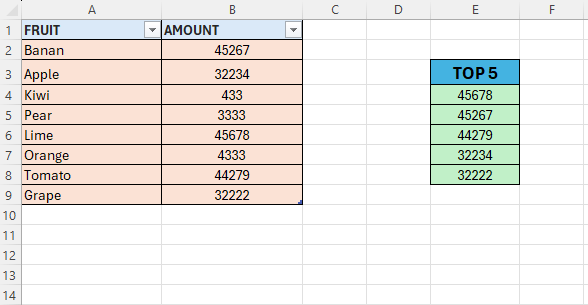
The LARGE function takes an array and returns the largest N values in a dataset based on a specified position (k).
We are going to use a formula to calculate the position, using ROWS()
- In cell E4, type the formula in step 2
- =LARGE($B$2:$B$9;1)
- This will return the highest value in the range B2:B9
- We can solve the problem by changing the value to 2,3,4,5
- This is not convenient so we are going to use ROWS instead
- Edit the formula to look like in step 7
- =LARGE($B$2:$B$9;ROWS(A$2:A2))
- Drag this down 5 rows to get the top 5 values
The A$2 keeps the starting point locked to row 2, while A2 adjusts
 Excel tutorials
Leave a comment