In the previous part we did some examples on calculating working hours. In this part we are going to do the same, but using another approach.
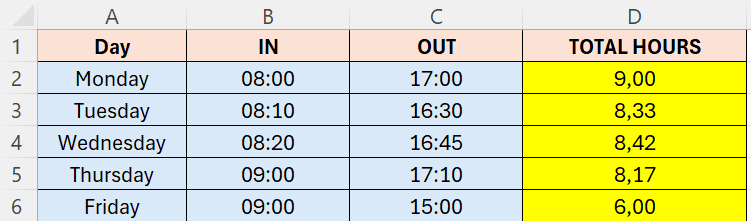
- Make sure to format columns B and C in a Time format hh:mm
- Column D is formatted as Number with 2 decimals
- The formula in D2 is OUT minus IN
- But a day has 24 hours, so we will multiply this by 24
- (OUT-IN)*24
- The formula in D2 will look like below
- (C2-B2)*24
Because the D column now is in a Number format, we can make further calculations in this later on.
 Excel tutorials
Leave a comment