In this post, we are going to make a scoreboard with images. Rather, we will make use of conditional formatting and icon-sets.
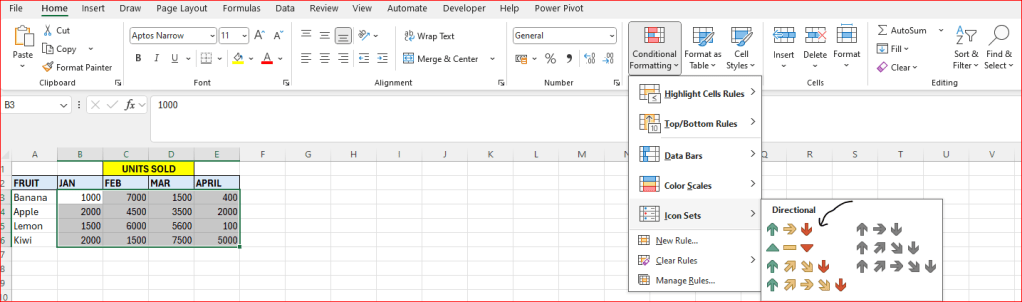
Below we enter some fruits, and their monthly sales. Depending on the number, we can choose to represent the score with an arrow. Good numbers are represented with green arrows.

Follow the steps to achieve above:
- Enter the numbers in columns B to E
- Select the above cells
- Go to “Conditional formatting” – select “Icon Sets” and select the first image – see below picture.
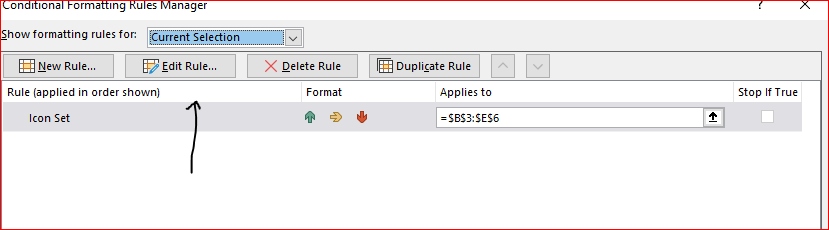
Next hit “Manage Rules” and then “Edit Rule”
Select “Format all cells bades on their values”
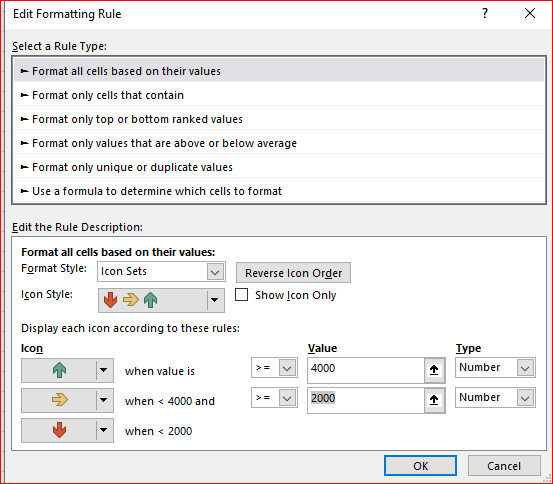
At the bottow, set the values you want, make sure you choose “Number” under “Type”.
 Excel tutorials
Leave a comment