In our daily business it is important to keep track of profits and margins – we can easily do this in Excel.
Below we have some example data to play with:
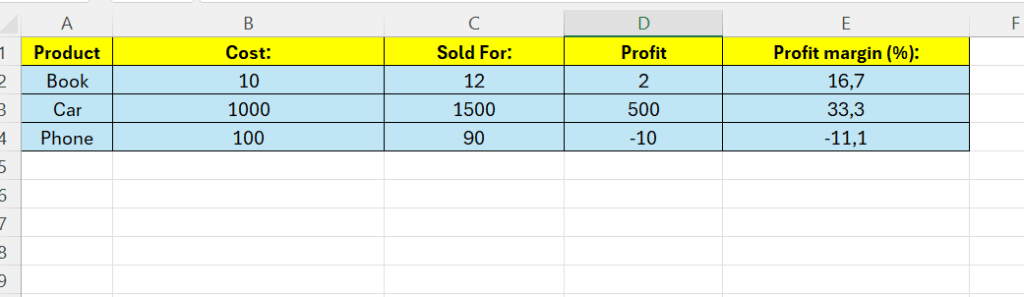
Above we have some products, what we bought them for, and what we sold them for – column D is supposed to calculate the profit – and column E are going to calculate the profit margin.
The formula for profit is pretty simple – it is the sale price and subtract the cost.
Enter the following formula in D2:
=C2-B2
Drag the formula down to fill the rest of the rows.
To calculate the profit margin in column E – the formula is as follows:
(Profit divided by sale price ) multiplied by 100
=(D2/C2)*100

 Excel tutorials
Leave a comment