
In Excel we can combine a number of functions to retrieve the longest string or word in our worksheet.
We are going to combine the LEN,MAX,INDEX,MATCH functions to get the longest string in our worksheet.
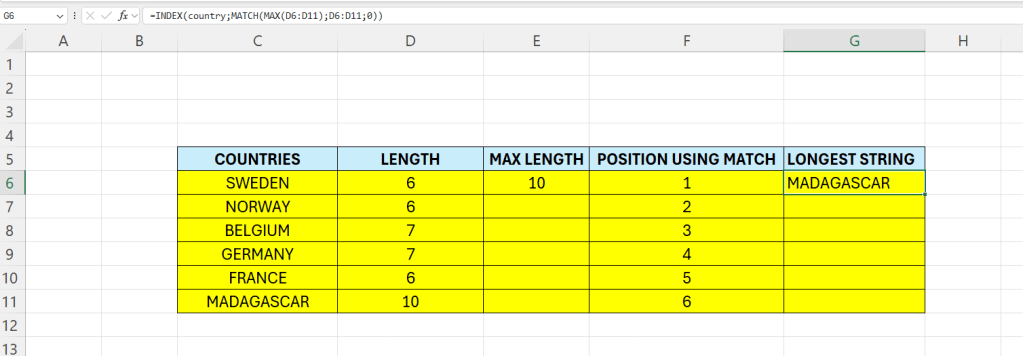
Enter some data in column C:

In this minimal example we can see that the longest string is located in C11.
In column D we have a formula for the lenght of the countries:
=LEN(country)
country is the named range (C6:C11)
In column E we calculate which country has the most letters in it:
=MAX(LEN(C6:C11))
In column we calculate the position for each country – this is just for visualization – and to better understand the formula:
=MATCH(C6;country;0)
The complete formula in G6 will now be like this:
=INDEX(country;MATCH(MAX(D6:D11);D6:D11;0))
The formula can be read and simplified like this:
=INDEX(country;MATCH(D11;D6:D11;0))
=INDEX(country;MATCH(D11;D6:D11;0))
The MATCH-part will return row 6:
=MATCH(D11;D6:D11;0)
=INDEX(country;6)
 Excel tutorials
Leave a comment